
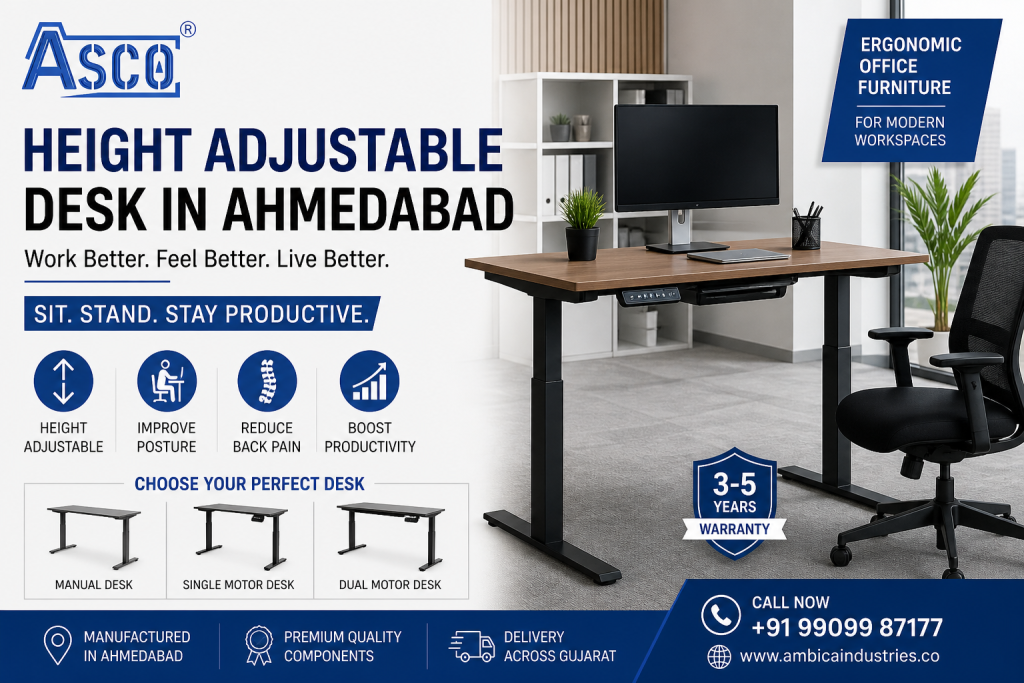
A height adjustable desk gives office professionals the flexibility
to work while sitting or standing by changing the height of the work surface.
Therefore, it can be a practical choice for modern offices, home offices,
corporate workplaces and flexible work environments.
Whether you are searching for a height adjustable desk in Ahmedabad,
an electric standing desk for a corporate office, or an adjustable office table
for a home workspace, the right model should be selected according to height range,
stability, load capacity, adjustment mechanism, desktop size and daily usage.
A height adjustable desk, also called a sit-stand desk,
standing desk or adjustable office desk, allows the user to change the
working height instead of remaining at one fixed desk position throughout
the day.
As a result, employees can alternate between sitting and standing while
working, reading, attending calls or performing other suitable tasks.
Moreover, an adjustable work surface can make it easier to accommodate
different users and different workstation setups.
This complete guide explains the main types of height adjustable desks,
important specifications, electric and manual mechanisms, ergonomic setup,
workstation compatibility, maintenance, pricing considerations and what
to check before purchasing one in Ahmedabad or elsewhere in Gujarat.
Height Adjustable Desk Guide
-
What Is a Height Adjustable Desk?
-
How Does a Height Adjustable Desk Work?
-
Types of Height Adjustable Desks
-
Electric Height Adjustable Desks
-
Manual Height Adjustable Desks
-
Pneumatic Height Adjustable Desks
-
Height Adjustable Desk Features
-
Height Range and Adjustment
-
Load Capacity and Stability
-
Desktop Size and Materials
-
Height Adjustable Desk Ergonomics
-
Benefits of Height Adjustable Desks
-
Electric vs Manual Height Adjustable Desk
-
How to Choose a Height Adjustable Desk
-
Height Adjustable Desks for Offices
-
Height Adjustable Desk Maintenance
-
Common Height Adjustable Desk Problems
-
Height Adjustable Desk Price and Budget
-
Height Adjustable Desk in Ahmedabad and Gujarat
-
Frequently Asked Questions
What Is a Height Adjustable Desk?
A height adjustable desk is a desk with a mechanism that allows
the work surface to move upward or downward. Unlike a conventional fixed-height
desk, it can be adjusted to suit different sitting and standing positions.
Depending on the model, adjustment can be controlled by an electric motor,
hand crank or pneumatic mechanism. Consequently, users can select the mechanism
according to their budget, adjustment frequency, load requirements and available
electrical access.
In modern workplaces, height adjustable desks are increasingly associated with
flexible workstation design because the same desk can accommodate different users
and different working positions.
How Does a Height Adjustable Desk Work?
Although different designs use different mechanisms, the basic principle remains
straightforward. The desk frame supports the desktop and allows its height to
change within a specified range.
Main Components of a Height Adjustable Desk
-
Desktop: The work surface used for monitors, keyboards,
documents and other equipment. -
Adjustment Frame: The structural system that moves the
desktop upward or downward. -
Motor or Mechanical Mechanism: Provides the force required
for height adjustment. -
Legs and Base: Support the desk and influence stability
throughout the height range. -
Control Panel: Electric models may include buttons,
digital controls and memory presets. -
Cable Management: Helps keep electrical and computer cables
organized while the desk moves.
Furthermore, a good design should allow the desktop to remain stable while
moving and after reaching the selected height.
Types of Height Adjustable Desks
There are three main types of height adjustable desks discussed
in the existing product guide: electric or motorized, manual and pneumatic.
Each has different advantages and limitations. :contentReference[oaicite:3]{index=3}
1. Electric Height Adjustable Desk
Uses an electric motor to raise and lower the desktop. It is particularly
suitable when users need to change positions frequently.
2. Manual Height Adjustable Desk
Uses a hand crank or mechanical adjustment system. It can be suitable
where adjustments are less frequent and electrical operation is not required.
3. Pneumatic Height Adjustable Desk
Uses spring or gas-cylinder assistance to make height changes easier
without relying on an electric motor.
4. Dual-Motor Electric Desk
Uses two motors within the lifting system. The source material identifies
dual-motor systems as a premium option for stability, faster movement and
heavier loads. :contentReference[oaicite:4]{index=4}
Electric Height Adjustable Desk: Features and Benefits
An electric height adjustable desk is operated using a powered
motor. Therefore, users can change desk height quickly without manually turning
a crank.
Key Electric Desk Features
- Electric motor adjustment
- Push-button height control
- Memory height presets on supported models
- Smooth adjustment
- Suitable for frequent sitting-to-standing transitions
- Potentially higher load capacity depending on frame and motor specification
According to the supplied source material, electric models may use single or
dual motors, while memory presets can store preferred working heights. :contentReference[oaicite:5]{index=5}
Single Motor vs Dual Motor Height Adjustable Desk
| Feature | Single Motor | Dual Motor |
|---|---|---|
| Motor system | One motor | Two motors |
| Adjustment | Suitable for regular use | Faster and smoother according to the supplied guide |
| Load handling | More appropriate for lighter loads | Better suited to heavier loads |
| Stability | Depends strongly on frame design | Source material identifies better stability |
| Typical use | Standard office setups | Frequent adjustment and heavier professional setups |
Manual Height Adjustable Desk
A manual height adjustable desk uses a hand crank or mechanical
adjustment mechanism rather than an electric motor.
Consequently, it does not require an electrical connection for height adjustment.
This can make manual models attractive for budget-conscious buyers or locations
where electrical access is limited.
Advantages of Manual Adjustable Desks
- Lower purchase cost
- No electric motor
- No motor power requirement
- Mechanically straightforward design
- Suitable for occasional height changes
However, manual adjustment requires physical effort. Therefore, if the user
intends to change desk height several times throughout the working day,
an electric model may be more convenient.
Pneumatic Height Adjustable Desk
A pneumatic height adjustable desk uses a spring-assisted or
gas-cylinder mechanism to help raise and lower the work surface.
As a result, pneumatic models can provide a middle ground between traditional
manual mechanisms and powered electric desks.
Pneumatic Desk Advantages
- No electric motor required
- Easier adjustment than a basic crank in many designs
- Relatively quick adjustment
- Useful where electrical access is limited
Nevertheless, the actual lifting capacity, adjustment smoothness and long-term
performance depend on the specific mechanism and construction.
Important Height Adjustable Desk Features
Choosing a height adjustable desk should involve more than
checking whether the desk moves up and down. Instead, evaluate the complete
system.
1. Height Adjustment Range
The desk should provide a useful sitting and standing range for the intended
users. The supplied guide identifies approximately 65–70 cm as a useful lower
range and approximately 115–120 cm as a standing range, although the correct
setting ultimately depends on the individual user and workstation configuration.
:contentReference[oaicite:6]{index=6}
2. Load Capacity
Load capacity refers to the amount of weight the desk mechanism is designed
to support, including the desktop, monitors, computer equipment and other items.
Therefore, calculate the expected equipment load before selecting a desk.
3. Stability
Stability becomes particularly important as a desk reaches greater heights.
A desk that feels stable while sitting may behave differently when fully extended.
The supplied guide recommends checking movement at maximum height and ensuring
that the desk is properly assembled and level. :contentReference[oaicite:7]{index=7}
4. Adjustment Speed
Adjustment speed matters when users change positions frequently. The source
material identifies approximate adjustment times of 20–40 seconds for dual-motor
electric systems, 30–60 seconds for single-motor systems and 2–3 minutes for
manual crank systems. :contentReference[oaicite:8]{index=8}
5. Memory Presets
Memory presets can be particularly useful when multiple people share a desk.
Each user can save an appropriate height and return to it quickly.
6. Cable Management
Cable management is especially important for electric desks because the desktop
moves. Cables should have enough slack and should not become trapped, stretched
or pinched during adjustment.
Height Adjustable Desk Height Range: What Should You Check?
Desk height should not be selected simply because a specification sheet lists
a particular number. Instead, the range should accommodate the intended user’s
seated and standing working positions.
The key principle:
At the selected working height, the keyboard and mouse should allow the
user’s arms and wrists to remain in a comfortable, neutral position.
Likewise, the monitor should be positioned so that the user does not need
to repeatedly bend or tilt the neck.
OSHA’s workstation guidance recommends adjustable work surfaces and emphasizes
proper placement of monitors, keyboards and other components. :contentReference[oaicite:9]{index=9}
Height Adjustable Desk Desktop Size and Materials
The lifting frame is only one part of the desk. The desktop also determines
how much equipment can be placed on the workstation.
Engineered Wood and Laminate
Engineered wood or laminate surfaces can provide a practical balance of
appearance, durability and cost for office environments.
Solid Wood
Solid wood can provide a premium appearance. However, the weight of the desktop
should be included when calculating the total load on the lifting system.
Metal
Metal surfaces can provide a professional or industrial appearance and may be
suitable for specific commercial applications.
Desktop Size
Choose the desktop according to the equipment being used. A single-monitor
workstation may require less space than a dual-monitor setup with documents,
accessories and additional equipment.
OSHA recommends sufficient work-surface depth to accommodate the monitor and
other frequently used components without forcing awkward reaching positions.
:contentReference[oaicite:10]{index=10}
Benefits of a Height Adjustable Desk
The primary advantage of a height adjustable desk is flexibility.
Instead of being locked into one desk height, the user can alter the work surface
according to the task and working position.
1. Allows Sitting and Standing
Users can alternate between seated and standing work positions. Consequently,
the workstation can support greater postural variety throughout the day.
2. Supports Individual Adjustment
People have different body dimensions. Therefore, a fixed desk may not suit
every employee equally. An adjustable desk can provide greater flexibility
when the work surface needs to be raised or lowered.
3. Useful for Shared Workstations
When several employees share a workstation, height adjustment can make it easier
for different users to configure the desk.
4. Supports Flexible Office Design
Modern offices increasingly use flexible workstations. Therefore, an adjustable
desk can complement an office environment where employees change positions
or work styles during the day.
5. Can Help Reduce Static Posture
OSHA notes that maintaining the same posture or sitting still for prolonged
periods is not healthy and recommends changing working positions periodically.
:contentReference[oaicite:11]{index=11}
Important:
A height adjustable desk is not a substitute for movement, breaks or
appropriate workstation setup. Standing continuously is also not the goal.
Instead, the practical objective is to allow users to vary their working
position and configure the workstation appropriately.
Height Adjustable Desk Ergonomics: How to Set It Correctly
Purchasing an adjustable desk is only the first step. Proper configuration
matters just as much.
Sitting Position
- Keep feet supported on the floor or a suitable footrest.
- Keep shoulders relaxed.
- Keep elbows close to the body.
- Position the keyboard and mouse within comfortable reach.
- Adjust the desk and chair together.
Standing Position
- Keep feet comfortably supported.
- Avoid locking the knees.
- Keep shoulders relaxed.
- Position the keyboard around elbow height.
- Keep the monitor in a comfortable viewing position.
OSHA’s guidance emphasizes neutral body positioning, relaxed shoulders,
elbows close to the body, supported feet and appropriate monitor positioning.
:contentReference[oaicite:12]{index=12}
Monitor Position
A height adjustable desk cannot correct an incorrectly positioned monitor.
Therefore, the monitor should also be adjusted when the user changes from
sitting to standing.
OSHA recommends positioning the monitor directly in front of the user and
keeping the viewing arrangement appropriate to reduce awkward neck positions.
:contentReference[oaicite:13]{index=13}
Keyboard and Mouse Position
Keep the keyboard and mouse close enough that the user does not repeatedly
reach forward or sideways.
This is particularly important because the objective of an adjustable desk
is not simply to raise the desktop. Instead, the entire workstation should
remain appropriately configured as the desk moves.
Electric vs Manual Height Adjustable Desk
| Factor | Electric | Manual | Pneumatic |
|---|---|---|---|
| Adjustment method | Motor | Hand crank | Spring/gas assistance |
| Electricity | Required | Not required | Not normally required |
| Frequent adjustment | Excellent | Less convenient | Good |
| Ease of use | Very easy | Requires manual effort | Easier than basic crank systems |
| Initial cost | Usually higher | Usually lower | Mid-range |
| Best suited for | Frequent sitting/standing changes | Occasional adjustment | Users wanting assisted manual adjustment |
How to Choose the Right Height Adjustable Desk
Before buying a height adjustable desk, ask the following questions.
In this way, you can compare models based on actual requirements rather than
selecting only by appearance or price.
1. How Frequently Will You Adjust the Desk?
If you expect frequent sitting-to-standing transitions, electric adjustment
may be more practical. Conversely, if the desk will rarely change height,
manual adjustment may be sufficient.
2. How Much Equipment Will Be Placed on the Desk?
Add the approximate weight of the desktop, monitors, computers, speakers,
accessories and other equipment. Then compare that figure with the manufacturer’s
stated load capacity.
3. Who Will Use the Desk?
A desk used by one person can be configured around that individual’s height.
However, a shared desk needs a useful adjustment range for all intended users.
4. What Desktop Size Do You Need?
A compact laptop setup requires less space than a multi-monitor professional
workstation. Therefore, select the desktop size according to actual equipment.
5. Is Cable Management Adequate?
Check how power, monitor and networking cables will move when the desk rises
and falls. Cables should have sufficient movement allowance and should not
become trapped.
6. How Stable Is the Desk at Maximum Height?
Stability should be evaluated across the full height range, not only when
the desk is at its lowest position.
7. Is the Manufacturer Able to Provide Service?
For electric desks, after-sales support can be especially important because
the product includes electrical and mechanical components.
Height Adjustable Desks for Modern Offices
A height adjustable office desk can be used in several workplace
environments, including corporate offices, technology companies, administrative
departments, executive workspaces and flexible work areas.
Corporate Offices
Corporate offices can use adjustable desks for employees who spend substantial
time working at computers. Furthermore, shared workstations can benefit from
adjustable settings when different employees use the same desk.
IT and Technology Workspaces
Developers, designers and other computer-based professionals may spend long
periods at a workstation. Consequently, an adjustable desk can provide greater
flexibility in workstation positioning.
Executive Offices
Executives can use height-adjustable workstations for desk work, calls,
video meetings and other tasks where changing working position is useful.
Home Offices
A standing desk can also be useful in a home office, particularly
when one room needs to accommodate both seated and standing computer work.
Height Adjustable Desk Maintenance and Care
Proper maintenance can help preserve the performance of the desk. However,
maintenance requirements vary by mechanism and manufacturer.
Keep the Desk Level
An uneven floor can affect stability. Therefore, ensure that the desk is
positioned correctly before diagnosing mechanical problems.
Do Not Exceed the Load Rating
Excessive weight can place unnecessary stress on the lifting mechanism.
Always stay within the manufacturer’s stated capacity.
Protect Electrical Components
Keep electrical components away from moisture and use suitable power protection
where recommended by the manufacturer.
Inspect Cables Regularly
Check that cables are not stretched, pinched or caught when the desk moves.
Check Frame Connections
If the desk begins to wobble, inspect assembly points and fasteners according
to the manufacturer’s instructions.
Common Height Adjustable Desk Problems and Solutions
Desk Wobbles at Standing Height
Wobbling can result from frame design, uneven flooring, loose connections
or excessive load. Therefore, first check the floor, assembly and load before
assuming the motor is defective.
- Check whether the desk is level.
- Verify the load.
- Check frame connections.
- Inspect the lifting system.
The supplied guide also identifies inadequate frame design, uneven floors
and load imbalance as potential causes. :contentReference[oaicite:14]{index=14}
Motor Does Not Operate
First check the power connection and control panel. If the problem continues,
follow the manufacturer’s troubleshooting procedure rather than opening
electrical components yourself.
Desk Moves Slowly or Unevenly
Uneven movement can be related to load, motor performance or the lifting
mechanism. Reduce unnecessary load and contact the manufacturer if the issue
persists.
Cables Become Tight
Cables need sufficient slack because the desktop changes position. Therefore,
route cables carefully and avoid placing them where the moving frame can
pinch them.
Memory Presets Do Not Work
Depending on the control system, resetting the panel or reprogramming the
presets may resolve the issue. If not, manufacturer service may be required.
Height Adjustable Desk Price and Budget Guide
The price of a height adjustable desk depends on the adjustment
mechanism, frame construction, motor system, desktop material, load capacity,
control system and customization.
The existing source material gives the following indicative ranges for
Ahmedabad: manual models around ₹15,000–₹25,000, single-motor electric models
around ₹25,000–₹40,000, and dual-motor electric models around ₹40,000–₹65,000.
These should be treated as indicative rather than fixed market prices. :contentReference[oaicite:15]{index=15}
| Desk Type | Indicative Range | Suitable For |
|---|---|---|
| Manual | ₹15,000–₹25,000 | Occasional adjustment and budget-focused setups |
| Single Motor Electric | ₹25,000–₹40,000 | Regular adjustment and moderate loads |
| Dual Motor Electric | ₹40,000–₹65,000 | Frequent adjustment, heavier equipment and professional offices |
However, prices can change according to configuration, materials, quantity,
customization, installation and current manufacturing costs. Therefore,
businesses should request a current quotation before making a purchase.
Height Adjustable Desk in Ahmedabad and Gujarat
Businesses searching for a height adjustable desk in Ahmedabad
may prefer to compare local manufacturing, customization, service and bulk
procurement options before purchasing.
Ambica Industries manufactures steel and wooden furniture in Ahmedabad under
the ASCO brand. Its current website specifically lists height adjustable desks
among its office furniture offerings. :contentReference[oaicite:16]{index=16}
Why Consider a Local Height Adjustable Desk Manufacturer?
- Easier communication about specifications
- Potential customization of desktop size and finish
- Local service and support
- Easier discussion of bulk corporate requirements
- Direct communication regarding installation
- Better understanding of project-specific requirements
Ambica Industries’ current height-adjustable-desk page states that its offering
includes dual-motor electric models, custom desktop sizes, memory presets,
professional installation and delivery/setup across Ahmedabad, Gandhinagar,
Surat and Rajkot. :contentReference[oaicite:17]{index=17}
Related ASCO Furniture Resources
Although this article focuses specifically on height adjustable desks, the
surrounding workstation should also be considered. Therefore, the following
ASCO resources can help when planning a complete adjustable workstation.
Height Adjustable Desks – Benefits, Features, Buying Guide & Pricing
— explore the dedicated ASCO height adjustable desk range.
Complete Guide to Office Chairs
— choose suitable seating to use together with an adjustable desk.
Complete Guide to Office & Dining Tables
— compare office table materials, dimensions and applications.
— explore the wider office furniture collection.
ASCO Chair and Furniture Resources
— explore office chair and furniture information from ASCO.
Ambica Industries / ASCO Furniture
— learn more about the Ahmedabad-based furniture manufacturer.
Height Adjustable Desk Ergonomics: Authoritative Resources
Choosing an adjustable desk is only one part of creating a comfortable
workstation. In addition, the monitor, keyboard, mouse, chair and work surface
should be positioned appropriately.
The U.S. Occupational Safety and Health Administration provides detailed
guidance on computer workstations, including desks, monitors, chairs,
posture and workstation arrangement.
OSHA – Computer Workstation Desks
— guidance on desk surfaces, clearance, monitor placement and adjustable
work surfaces.— guidance on neutral working positions and changing posture.
OSHA – Computer Workstation Components
— information covering desks, chairs, monitors, keyboards and other
workstation components.
OSHA – Computer Workstation Purchasing Guide
— useful considerations when evaluating workstation furniture.
Height Adjustable Desk Buying Checklist
Before ordering a height adjustable desk, check the following:
- Confirm the required minimum and maximum height.
- Check the total load capacity.
- Include the desktop weight in the calculation.
- Decide between electric, manual and pneumatic adjustment.
- Compare single-motor and dual-motor options.
- Check stability at maximum height.
- Check desktop dimensions.
- Consider the number of monitors and accessories.
- Check cable-management provisions.
- Ask about warranty coverage.
- Ask about installation.
- Ask about service and replacement parts.
- Request a current quotation.
Conclusion: Is a Height Adjustable Desk Worth Considering?
A height adjustable desk can provide a more flexible alternative
to a fixed-height workstation because users can change the desk position according
to their working needs.
However, the best desk is not necessarily the most expensive model. Instead,
choose according to the actual requirements of the user: adjustment frequency,
height range, load capacity, desktop size, stability, control system, cable
management and service availability.
For frequent adjustments, an electric or dual-motor system may be more convenient.
Conversely, occasional users may find manual systems sufficient. Meanwhile,
pneumatic designs can provide another option where electrical operation is not
preferred.
Most importantly, remember that an adjustable desk works best as part of a
properly configured workstation. The desk, chair, monitor, keyboard, mouse and
user’s working position should work together rather than being considered
separately.
Looking for a Height Adjustable Desk in Ahmedabad or Gujarat?
ASCO Furniture by Ambica Industries offers height adjustable desk solutions
for offices, corporate workspaces and other professional environments.
Discuss your required size, configuration, desktop material and quantity
with the manufacturer.
Frequently Asked Questions About Height Adjustable Desks
What is a height adjustable desk?
A height adjustable desk is a workstation whose desktop can be raised
or lowered to accommodate different working heights and positions.
What is another name for a height adjustable desk?
Common terms include sit-stand desk, standing desk, electric standing desk,
adjustable office desk and height adjustable office table.
Are electric height adjustable desks better than manual desks?
It depends on usage. Electric models are generally more convenient for
frequent adjustments, while manual models can be suitable for occasional
height changes and budget-focused applications.
Is a dual motor height adjustable desk better?
A dual-motor system can provide advantages in adjustment speed, stability
and load handling, depending on the specific frame and motor design.
Therefore, compare the complete specifications rather than motor count alone.
What height should a standing desk be?
There is no single height that fits everyone. The correct standing height
depends on the user’s body dimensions and workstation setup. The keyboard
should be positioned around a comfortable elbow height while the monitor
should be positioned for a neutral viewing posture.
Can multiple people use one height adjustable desk?
Yes. An adjustable desk can be useful for shared workstations because
different users can select different working heights. Memory presets can
make this process faster on supported electric models.
What should I put on a height adjustable desk?
A typical workstation may include a monitor, keyboard, mouse, laptop,
documents and other office equipment. However, the total load should
remain within the desk’s specified capacity.
How do I prevent a height adjustable desk from wobbling?
First, make sure the desk is level and properly assembled. Then check
frame connections and load distribution. If wobbling continues, contact
the manufacturer rather than modifying the lifting mechanism.
How much does a height adjustable desk cost in Ahmedabad?
Indicative prices in the supplied ASCO guide range from approximately
₹15,000 for manual models to ₹65,000 or more for premium dual-motor
electric configurations. Actual pricing depends on specifications,
materials, customization and quantity. :contentReference[oaicite:18]{index=18}
Where can I buy a height adjustable desk in Ahmedabad?
ASCO Furniture by Ambica Industries manufactures furniture in Ahmedabad
and currently lists height adjustable desks among its furniture offerings.
The manufacturer can be contacted for current specifications, pricing,
customization and project requirements. :contentReference[oaicite:19]{index=19}
ASCO Furniture – Ambica Industries
Height Adjustable Desk Manufacturer in Ahmedabad, Gujarat
3, Patel Timber Market, Near Reliance Petrol Pump,
Narol-Isanpur Highway, Narol,
Ahmedabad – 382443, Gujarat, India.
Phone:
+91 9909987177
Email:
enquiry@ambicaindustries.co
Website:
ambicaindustries.co
ASCO® is the furniture brand of Ambica Industries, Ahmedabad, Gujarat.
Product specifications, prices, warranty, availability, installation and
delivery terms may vary by model and project. Confirm current specifications
and commercial terms with the manufacturer before ordering.